[email protected]
 首拼•中文•学习帮助(Help)
1.各说明版本(中文)
2.HSPin的基本功能(中文/English)
3.用户服务(中文)
一、各说明版本(中文)
首拼中文学习分为三个版本,初级版、中级版、高级版。初级版(Beginner level) :
含有1-3级608个音节;汉字1-3级900个+4-6级900个;词汇1-3级2245个;语句345个。(含1-3级语法)中级版(Intermediate level) :
含有1-6级908个音节;汉字1-6级1800个;词汇1-6级5456个;语句345+280个。(含1-6级语法)高级版(Advanced level) :
含有1-9级1110个音节;汉字1-9级3000个;词汇1-9级11092个;语句345+280+143个。(含1-9级语法)- 初级版的汉字语句和首拼语句是一对一的,便于初学者快速对照学习。
- 中级版+高级版的汉字语句和首拼语句是按每个语法节分段对照。点击各节的汉字语句“首.拼”链接,
就可以进入到该节对应的首拼语句,对照结束后按该节首拼语句的“返.回”链接,就返回到对应的汉字语句。
二、HSPin的基本功能(中文/English)
(各版本基本功能一致,差别在于字词、语句的数量!
All versions share the same basic functions; they only differ in the number of words, phrases and sentences!)
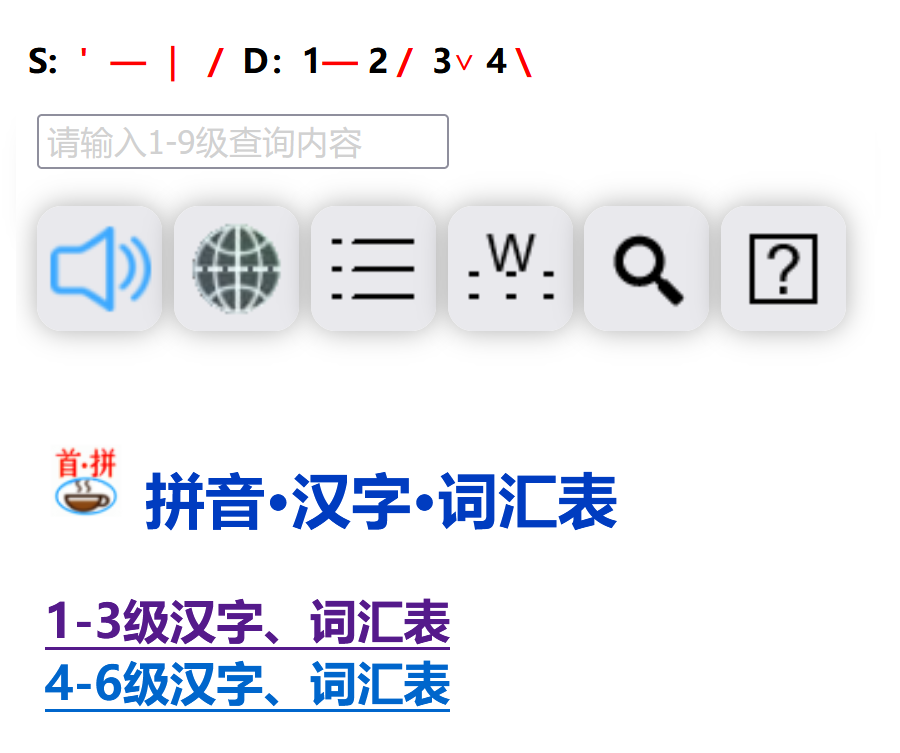
编辑框(Edit box)
位于带有六个功能键上面的空白长框就是编辑框,编辑框可以输入汉字、词组和拼音,首拼的拼音都带有首笔划自动切分,普通拼音词组需要用空格隔开才能正常发音,编辑框可以输入或粘贴汉字和首拼、拼音。编辑框下面有:声母表、韵母表、声调符号、400个无声调音节表,可以点击朗读1000多个带声调的音节,极大地方便拼音初学者的学习。
The long blank box above the six function keys is the edit box. You can input Chinese characters, phrases and pinyin here. Pinyin of initial consonants is automatically split by the first stroke. For regular pinyin phrases, separate each part with a space to ensure proper pronunciation. You may also type or paste Chinese characters, initial pinyin and full pinyin into this box. Below the edit box are the initial consonant table, final table, tone marks and a list of 400 toneless syllables. You can click to play the audio of over 1,000 toned syllables, which greatly facilitates learning for pinyin beginners.发音功能键(Speaker button)
编辑框下的第一个功能键是发音功能键,当编辑框输入有“漢検漢字“中文汉字、词语或首拼拼音、拼音等,就可以按下小喇叭发音功能键,系统会自动把编辑框内容阅读两遍。
The first function key below the edit box is the pronunciation button. After you enter Chinese characters, words, initial pinyin or full pinyin in the edit box, tap the speaker icon to play the audio. The system will read out the content twice automatically.主页面框键(Home button)
编辑框下的第二个地球图标的功能键是主页面框功能键,无论当前位于子网页或是外网页,当编辑框为空时,按下主页面框功能键就保证工具条下总是显示初始主网页;当编辑框非空时,直接搜索主网页1-6级汉字或词组、生字内容。
The second function key below the edit box features an earth icon and serves as the home page button. Whether you are on a subpage or an external page: if the edit box is empty, pressing this key will return you to the original home page under the toolbar. If the edit box contains content, it will directly search for Chinese characters, words and new characters ranging from Level 1 to Level 6 on the home page.语句功能键(Sentences button)
编辑框下的第三个是语句功能键,点击该功能键,就可以检索到带有输入框关键词亮度标记的各级“语句练习”,其中包含了每一级的语句练习,每组语句又是按照各级语法重点来组织,并用红色的字体来重点提示。学员可以分别复制语句中词组或语法关键词,在编辑框进行各级造句练习,可以快速提升自己的中文表达能力。
The third button below the edit box is the Sentence key. Click it to search for graded sentence exercises where the entered keywords are highlighted. These exercises are categorized by level and arranged around key grammar points, with key parts marked in red. Learners can copy phrases or grammar keywords from the sentences to make new sentences in the edit box, effectively improving their Chinese expression skills.字词查询键(Word Search button)
编辑框下的第四个是字词查询键,点击触发对编辑框已经输入的单个汉字或词组进行查询,给出汉字、词的来源和各种示例解释。
The fourth button below the edit box is the Word Search button. Click it to search for the single Chinese characters or word entered in the box, and the system will display their origins and detailed explanations with examples.外网AI搜索键(External AI Search)
编辑框下的第五个搜索图标是AI搜索键,点击触发对编辑框已经输入的单个汉字笔划书写或词组进行AI智能搜索。
The fifth button below the edit box features a search icon and serves as the AI Search key. Click it to launch an AI-powered search for the stroke order of individual Chinese characters or phrases entered in the edit box.生字查询键(New Character Lookup button)
编辑框下的第六个是中文生字查询键,点击该键就会带有点横竖撇“丶一丨丿”和22个末笔最小汉字(独体字)“a-z”的页面,这时先点击某个首笔划"-",再点击某个最小汉字字母k,就可以在输入框看到”uhk“,再点击第二个地球图标的功能键,就可以查出所有首笔"-",末笔最小汉字(独体字)为k,所有生字,例如:“石”字。
The sixth button below the edit box is the New Chinese Character Lookup button. Clicking it opens a page displaying initial strokes (dot, horizontal, vertical, left-falling: 丶 一 丨 丿) and 22 basic single-component characters marked with letters a to z. First select an initial stroke "-", then tap a letter corresponding to a basic character such as k. The code like "uhk" will appear in the input box. Next, click the second earth-icon button, and the system will retrieve all new characters that start with the chosen initial stroke "-" and end with the basic single-component character k — for example, the character "石".首笔划(Initial strokes)S:`-|/
在编辑框上部,分别点击四个首笔划S:就可以分别在编辑框输入点横竖撇,这是为了方便通用键盘上在输入框输入首拼的首笔划。
At the top of the edit box, there are four buttons marked S:`-|/ for initial strokes. Click each to input dot, horizontal, vertical and left-falling stroke respectively. This design lets users easily enter initial strokes via a standard keyboard when typing initial pinyin.PY:1— 2/3∨ 4\
点击带下滑线的PY,可以进入拼音王国课程,可以学习完整的拼音规则;在编辑框a e i o u v字母后,在编辑框上部,分别点击1— 2/3∨ 4\四个声调就可以分别在a e i o u v头顶上直接输入拼音的四声,这样通用键盘可以输入完整的带声调的拼音。
Click the underlined PY to enter the Pinyin Course, where you can learn complete pinyin rules. After entering the letters a, e, i, o, u or v in the edit box, click the four tone buttons marked 1— 2/3∨ 4\ at the top of the box. The four pinyin tones will be added directly above the vowels. This allows you to type full toned pinyin using a standard keyboard.CL:123
在编辑框上部CL:n,n=1、2、3分别表示进入对应的hspin一级、二级、三级中文语句学习课程,例如进入一级后,请点击L1.1-L1.9一级课程共九课,分别有中、日文对照课程讲解,汉语初学者可根据情况选择,但通过学习、能听懂中文课程讲解对学习汉语帮助最大!
Above the edit box are buttons labeled CL:n, where n stands for 1, 2 and 3, corresponding to Level 1, 2 and 3 Chinese sentence courses. For instance, after entering Level 1, you may choose from nine lessons marked L1.1 to L1.9. Each lesson features explanations in both Chinese and English. Beginners can pick lessons as needed. Understanding the course explanations in Chinese will greatly boost your Chinese learning!
三、用户服务(中文)
ShoupinSpeech v1.1电脑、平板、手机各平台适用
中国专利号:ZL 201110038016.8
中国专利号:ZL 201710017066.5
美国专利号:US10,496,183 B2
©2011 All rights reserved.
*本软件使用过程的全部数据均保存在本地,无需上传至服务器,实施全面地保护用户隐私政策。*
警告:本客户端程序受著作权法及专利权和国际公约的保护,未经授权擅自复制 或传播本程序的部分或全部,可能受到严厉的民事及刑事制裁,并将 在法律许可的范围内收到相关的起诉。
返回顶部返回搜索首页